Showing posts with label Ipad. Show all posts

Wednesday, August 24, 2011

Infographics! information consolidation superheroes to the rescue!

   So remember when you were in grade school (British translation: primary school) and your teachers kept emphasizing how important it was to be able to read charts and graphs?... no? Well in my early education they certainly did. Over and over again we were asked relatively simple questions about graphs and charts. Rabid math and science teachers tried to convince me and my young gum-chewing, nose-picking peers of their value. "Look!" they said, drooling, "see how amazing it is that you can display lots of information in simple visual way?!". My fellow classmates and I would stare at them in unamused silence. Years later, I left school vowing never to be involved in a profession that relied heavily on math and promptly forgot my teachers well-intentioned words of wisdom. Until now!

   Whether or not you study information science, it's clear to see that information is what controls our current lifestyle. Never before have we had access to some much at our fingertips. As I and countless others have mentioned before, information overload is an inevitable result of this boon. People want well organized information and as much of it as possible. Consolidation and Organization are in! Behold a world of databases, social tagging, and twitter! As much information, as organized and as easy to understand as possible!..thus the INFOGRAPHIC!
The infographic allow us to tame the dissonant information chaos around us and make POINT without shouting! . . . (imagine that)
But don't take my word for it. Let's listen to an expert...


Let me interrupt all this excitement with one quick caveat...As David McCandless mentioned whoever can manipulate the most information controls everything. So be a good little journalist and be sure to check the credibility of your sources.
(Corn Refiners Association & America's Natural Gas Alliance...I mean you!) 
case & point
Anyway, on the more happy stuff! So what does all this hubbub about infographics mean to a Web 2.0, interactive, semantic web, techie-buzzword world!? As you saw in the first video, infographics can become interactive...check out the example below for something that takes this to another level:


So want to design some infographics of your own?

  • Check out this article this article about 10 of the best free inforgraphic tools. 
  •  Lucidchart. It is not as dynamic as some of the other tools, but it still allows you to easily create flowcharts quickly, easily, and socially. Plus I am a sucker for the "Hey Jude" flow chart video.
  • Prezi - those in cdp23 know it well...yes i know its more of a presentation tool but you can create infographics within it

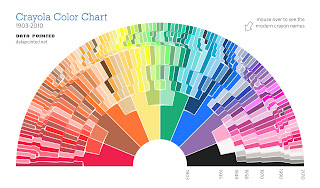
    Infographics Just for fun:


    click the pic for an enlarged view


    Also check out
    Cool Inforgraphics.coman awesome blog that posts interesting inforgraphics from all over the web


    Sunday, July 31, 2011

    Thing 8,9, & Presenting StudyBlue!


     I am a goggle fanatic. I use it daily sometimes hourly. I have two email accounts, a blog, and Goggle+ account. However, I can not get used to Google Calendar. I grew up using computers in some form from the age of  8 but there are still somethings I have to do the "old fashioned way". While Google Calender can go anywhere on any device. I like being able to physically change and add things. That's why I've also using been the wipe-off calendar above my desk since high school and why I buy a paper planner every year. There is something satisfying to the ritual of keep a physical calendar. I like that I can flip through the pages of my event book and see where I am going and where I've been.  I get a sense of accomplishment to wiping of everything off of my desk calendar and updating it every two weeks or so. It keeps me focused on what is ahead. Now that I have an I pad I may try to use Google Calender when school starts...but if I do I know I'll still keep up with my wipeoff board.


     A few weeks ago cdp23 introduced us to Pushnote. While an interesting application, I found it to be more of a hindrance than a help. Another account to keep track of, check, and update. As I have mentioned before it also didn't seem to provide information on sites I wanted.  This weeks suggestions of Evernote led me to roll my eyes figuring this would be more of the same. Not so. Evernote is what I have always wanted from delicious  it lets you clip and organize websites, keeps notes, and sync this record to call devices...kind of like a combination between Delicious, Pushnote, and Dropbox. I beyond anal retentive about organizing my bookmarks...especially the ones I visit often..Evernote allows me to "clip" the website and add notes to it. The only thing that disappointed me is that it there is currently no web clipper for the Ipad.


      One of the other great features of Evernote is that besides the fact that I can sync my library from my laptop and my Ipad ....is that I can also sync it with other applications. Evernote Trunk  is an part of the Evernote site that lists all the applications you can use with Evernote. I can sync PDFs from my Dropbox to Evernote and make notes on them, I can sync emails and add notes, etc.


    One cool application I found through trunk is called:

        Like Flashcard Machine....Study Blue allows you to  create flash cards, and search share or upload flashcards made by others. However, StudyBlue also allows you to store, share, create, and download notes. Click the image below to see a screen shot of StudyBlue flash card creator.


     Unfortunately for NOW you can only create flash cards on computers however the Study Blue Ipad app does allow you to view the notes and flash cards already existent in your account. I DO NOT recommend using StudyBlue on the Ipad for anything but flashcards.

    There is a way to sync your StudyBlue notes to Evernote so you can edit them in there....but I honestly think I will only be using StudyBlue for flashcards.


    Here is a little video I made of me using the StudyBlue App to view a flashcard I created. This also the first video I've ever created and uploaded so I hope it works!